mycli
Mycli is a command-line interface for MySQL with:
- auto-completion
- syntax highlighting
- fuzzy history search
- LLM support
- dataframe support
- integrations with: SSH, Kubernetes, Vault, and Boundary
- and much more!
It is compatible with MySQL, MariaDB, Percona, TiDB, and Apache Doris.
Release 2.0.0
Mycli release 2.0.0 has breaking changes!
https://github.com/dbcli/mycli/blob/v2.0.0/changelog.md#breaking-changes.
Source
https://github.com/dbcli/mycli
Demo
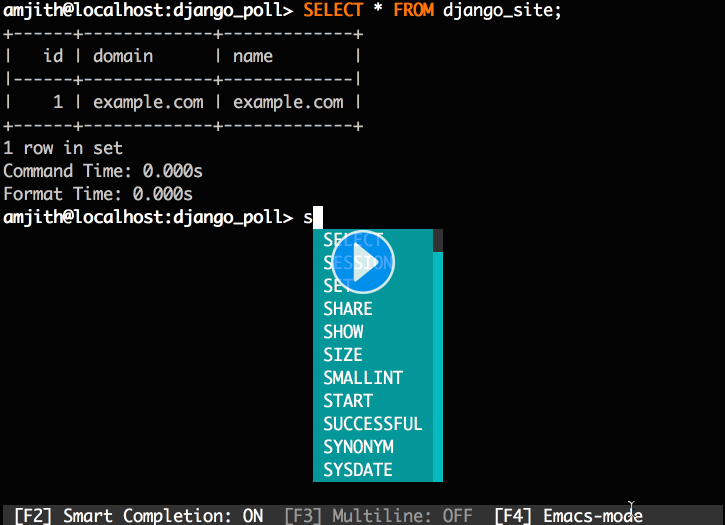
Quick Start
If you already know how to install Python packages, then you can simply use pip:
$ pip install --upgrade 'mycli[all]'
though installing fzf via your package manager is also recommended for fuzzy
history search. You might need sudo on Linux.
If you're on macOS you can install an up-to-date mycli via Homebrew:
$ brew update && brew install mycli pygments
where pygments is optional.
Mycli also needs the less executable, which is usually installed by default on Mac and Linux systems.
See the install page for more detailed instructions.
Try Without Installing: uv
If you use uv you can try mycli without installing:
uv tool run 'mycli[all]' --help
Try Without Installing: Docker
If you use Docker, you can try mycli without installing, with a sample database included:
docker run --pull=always -it ghcr.io/dbcli/mycli:latest
Usage
$ mycli --help
Usage: mycli [OPTIONS] DATABASE

  Rich MySQL terminal client with auto-completion, syntax highlighting, and
  dataframes.

  Examples:
    - mycli my_database
    - mycli --user my_user --host my_host.com my_database
    - mycli mysql://my_user@my_host.com:3306/my_database

Options:
  -h, --host, --hostname TEXT     Host address of the MySQL server.
  -P, --port INTEGER              Port number on the MySQL server.
  -u, --user, --username TEXT     User name to connect to the MySQL server.
  -S, --socket PATH               Socket path to connect to the MySQL server.
  -p, --pass, --password TEXT     Password to connect to the MySQL server..
                                  Use with a value to set the password at the
                                  CLI, or alone in the last position to
                                  request a prompt.
  --password-file PATH            File or FIFO path containing the password to
                                  connect to the server.
  --vault-address TEXT            "vault kv get" integration: value for
                                  $VAULT_ADDR if unset in the environment or
                                  ~/.myclirc.
  --vault-mount TEXT              "vault kv get" integration: value for -mount
                                  if unset in ~/.myclirc.
  --vault-secret TEXT             "vault kv get" integration: secret name.
  --vault-password-field TEXT     "vault kv get" integration: field containing
                                  the password.
  --vault-username-field TEXT     "vault kv get" integration: field containing
                                  the username.
  --ssl-mode [auto|on|off]        Set desired SSL behavior. auto=preferred if
                                  TCP/IP, on=required, off=off.
  --ssl-ca PATH                   CA file in PEM format.
  --ssl-capath DIRECTORY          CA directory.
  --ssl-cert PATH                 X509 certificate in PEM format.
  --ssl-key PATH                  X509 key in PEM format.
  --ssl-cipher TEXT               SSL cipher to use.
  --tls-version [tlsv1|tlsv1.1|tlsv1.2|tlsv1.3]
                                  TLS protocol version for secure connection.
  --ssl-verify-server-cert        Verify server's "Common Name" in its cert
                                  against hostname used when connecting.
  -v, --verbose                   More verbose output and feedback.  Can be
                                  given multiple times.
  -q, --quiet                     Less verbose output and feedback.
  -D, --database TEXT             Database or DSN to use for the connection.
  -d, --dsn TEXT                  DSN alias configured in the ~/.myclirc file,
                                  or a full DSN.
  --list-dsn                      Show list of DSN aliases configured in the
                                  [alias_dsn] section of ~/.myclirc.
  --completions [bash|zsh|fish]   Print a completion script for the selected
                                  shell.
  -R, --prompt TEXT               Prompt format (Default: "\t \u@\h:\d> ").
  --toolbar TEXT                  Toolbar format.
  -l, --logfile PATH              Log every query and its results to a file.
  --checkpoint TEXT               In batch or --execute mode, log successful
                                  queries to a file, and skip them on replay
                                  with --resume.
  --resume                        In batch mode, resume after replaying
                                  statements in the --checkpoint file.
  --myclirc PATH                  Location of the myclirc configuration file.
  --auto-vertical-output          Automatically switch to vertical output mode
                                  if the result is wider than the terminal
                                  width.
  --show-warnings / --no-show-warnings
                                  Whether to show warnings after executing a
                                  SQL statement.
  -t, --table                     Shorthand for --format=table.
  --csv                           Shorthand for --format=csv.
  --warn / --no-warn              Whether to warn before running a destructive
                                  query.
  --warn-batch                    Warn before running a destructive query when
                                  executing a script.
  --local-infile BOOLEAN          Enable/disable LOAD DATA LOCAL INFILE.
  -g, --login-path TEXT           Read this path from the login file.
  -e, --execute TEXT              Execute command and quit.
  --init-command TEXT             Initial SQL statement to execute when
                                  connecting.
  --unbuffered                    Instead of copying every row of data into a
                                  buffer, fetch rows as needed, saving memory.
  --charset, --character-set TEXT
                                  Character set for MySQL session.
  --batch PATH                    SQL script to execute in batch mode.
  --format [default|csv|tsv|table]
                                  Format for batch or --execute output.
  --throttle FLOAT                Pause in seconds between queries in batch
                                  mode.
  --progress                      Show progress on the standard error with
                                  --batch.
  --use-keyring [auto|true|false|reset]
                                  Store and retrieve passwords from the system
                                  keyring. auto means true, unless within an
                                  SSH connection.
  --keepalive-ticks INTEGER       Send regular keepalive pings to the
                                  connection, roughly every <int> seconds.
  --ssh-jump TEXT                 Open an SSH tunnel via [user@]host[:port]
                                  and connect to MySQL through it. Works best
                                  if SSH is configured not to prompt for a
                                  password interactively.
  --ssh-options TEXT              Extra CLI arguments for SSH with --ssh-jump,
                                  placed after options from ~/.myclirc.
  --kubectl-resource RESOURCE     Open a kubectl port-forward tunnel to
                                  RESOURCE and connect through it.
  --kubectl-options TEXT          Extra CLI arguments for kubectl with
                                  --kubectl-resource.
  --boundary-id TARGET_ID         Open a HashiCorp Boundary tunnel to
                                  TARGET_ID and connect through it.
  --checkup                       Run a checkup on your configuration.
  -V, --version                   Output mycli's version.
  --help                          Show this message and exit.
See also the /help guide at the mycli prompt,
and the ~/.myclirc file for configuration
which persists across sessions. The configuration document commentary is a
good reference for many of mycli's features.